2026 Best How to Program Solar Lighting Controllers?

Time:2026-11-07 Author:Henry
0%

Commercial solar lighting depends on more than a bright LED and a sunny site. The controller coordinates charging, battery protection, dusk-to-dawn operation, and dimming. Small settings matter.

IRENA’s Renewable Capacity Statistics 2025 reports that global solar capacity grew by about 452 GW in 2024. That rapid expansion makes reliable commissioning increasingly important, though it does not guarantee every lighting project will perform well. A poorly matched schedule can leave a pathway dark before dawn, even when the panels look correctly installed.

This guide explains how to program a commercial solar lighting controller, from checking the system’s wiring and battery type to setting operating modes and verifying nighttime performance. It covers practical details: confirm the panel receives unobstructed daylight, check the controller’s load rating, and test the programmed schedule after sunset. Record the original settings before changing them. That simple step makes troubleshooting easier.

Controller menus differ by manufacturer, so use the model-specific manual rather than assuming one button sequence fits every unit. Set dimming and low-voltage protection according to the battery and luminaire specifications. Then observe the system across several nights, including cloudy conditions. One commissioning visit is not enough. A candid limitation: no programming method can compensate for an undersized battery, poor solar exposure, or unrealistic autonomy requirements. The goal is a repeatable setup, supported by measured checks—not guesswork.
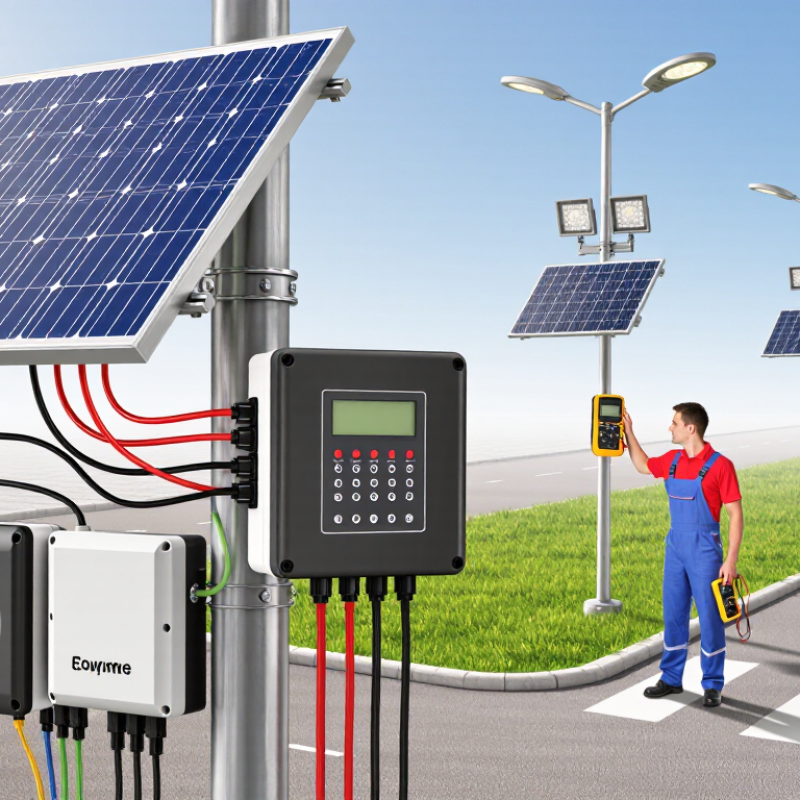
2026 Best How to Program Solar Lighting Controllers?

Understanding Solar Lighting Controllers and Their Operating Modes

A solar lighting controller coordinates charging, battery protection, and lamp operation. Its mode determines what happens after sunset. Dusk-to-dawn mode switches the lamp on at night and off near sunrise. Timed mode limits lighting to set hours, while motion-responsive mode raises brightness when movement is detected. Some systems combine these approaches, keeping a low light level before increasing output.

The IEA PVPS Snapshot of Global PV Markets 2024 reports that about 407 GW of solar capacity was added worldwide in 2023. That figure describes the wider PV sector, not solar lighting controllers, but it shows the scale of systems that depend on dependable control.

In practice, match settings to the site: a quiet path may suit motion dimming, while an entrance may need steady light. Check battery type, panel orientation, and seasonal night length before programming. Small details matter. A schedule that looks tidy on paper may leave a winter walkway dark. Record actual switch-on times and review them after cloudy weeks; controller menus can make adjustments feel more precise than the site really is.

Preparing the Solar Lighting System for Programming

Before programming a solar lighting controller, check the whole system, not just the settings screen. Make sure the panel is clean and firmly mounted, with no new shade from branches or nearby structures. Inspect cables for cuts, loose terminals, or signs of moisture. Small details matter.

Confirm that the battery and lighting load match the controller’s specifications. Check polarity against the wiring diagram, and use a suitable meter to verify voltage if you know how to do so safely. Follow the controller instructions when isolating or reconnecting components. Never guess at a terminal. A reversed connection can damage equipment.

Choose a clear time to program the system, ideally when you can see the display and reach the controller without rushing. Note the current settings before changing them, including dusk-to-dawn behavior, dimming periods, and any motion response. Keep a simple record of the date and changes. It is tempting to adjust several values at once, but that makes faults harder to trace. I still find that a neat setup can hide a poor battery connection, so recheck the basics before blaming the programming.

Setting the Clock, Dimming Levels, and Lighting Schedule

Set the controller’s clock before choosing a lighting schedule. Confirm the time zone and daylight-saving setting, then compare the display with local time. A one-hour error can shift the whole schedule. If the controller uses dusk and dawn sensing, check that nearby lamps or reflective surfaces do not confuse its light sensor.

Choose dimming levels around actual use. For a footpath, full output may suit evening arrivals, while a lower level can work after midnight. Keep entrances, steps, and crossings adequately lit. That sounds simple. Yet a schedule that looks tidy on screen can feel too dim on a wet, dark path. Test it in place, and adjust in small increments rather than guessing from indoors.

The U.S. Department of Energy and Pacific Northwest National Laboratory reported average lighting-energy savings of about 47% across studied networked lighting-control installations. Those commercial results are not a guarantee for solar fixtures, but they show why careful control settings matter. With solar systems, also check battery charge after several cloudy days. If the lamps dim too early, shorten the high-output period or reduce brightness gradually. Record the settings and review them after a week; one awkward interval is easy to miss during setup.

Configuring Battery Protection and Sensor Functions

Programming a solar lighting controller means protecting the battery before optimizing brightness. The IEA PVPS Snapshot of Global PV Markets 2024 reports that global solar capacity exceeded 1.6 terawatts by the end of 2023. More installations make dependable control settings increasingly important. Match charging limits to the battery chemistry and manufacturer’s specifications; do not copy voltage values from another system. Set low-voltage disconnect and reconnect thresholds with a clear gap, so a cloudy afternoon does not trigger rapid switching. Small details matter.

Sensor settings need the same care. Set the photocell threshold to distinguish genuine dusk from brief shade, then adjust the motion sensor’s range and hold time for the actual path or doorway. A narrow beam can miss someone approaching from the side. A long hold time can waste stored energy. Where supported, use lower output when no motion is detected, with brighter light on activation. Test this sequence after sunset, not only with a daytime bench test.

Record the battery type, thresholds, sensor delay, and dimming schedule before changing settings. Check operation on a cloudy day, when charging may be limited. Leave temperature compensation enabled only when the battery and controller support it. The small uncertainty is real: sensor placement can matter as much as the menu settings, and a quick test may not reveal every blind spot. Recheck after moving the fixture.

Testing and Troubleshooting the Programmed Controller

Testing and Troubleshooting the Programmed Controller

A programmed solar lighting controller needs a real dusk-to-dawn test, not just a successful settings screen. Check the battery voltage, panel input, and load output with a meter before testing the lamp. Cover the panel to simulate darkness, then uncover it and confirm the programmed delay or dimming response. Keep the test conditions consistent; passing clouds can make readings misleading.

Jordan and Kurtz’s review, published through the National Renewable Energy Laboratory, analyzed nearly 2,000 photovoltaic degradation rates and found a median near 0.5% per year. This is a useful benchmark, not a diagnosis: gradual light loss may come from aging panels, while sudden failure points elsewhere. Record voltage, current, switching time, and battery state at each check. Small details matter.

If the lamp stays on during daylight, inspect the panel sensor and wiring polarity before changing settings. If it shuts off too early, compare battery voltage with the controller’s low-voltage cutoff. Retest after one adjustment at a time. The log may look untidy at first. Keep it; it can reveal a pattern that memory misses.

FAQS

What does a solar lighting controller do?

It manages battery charging, battery protection, and lamp operation. Its settings determine when the light turns on and off.

Which operating mode suits a quiet path?

Motion-responsive mode can keep the light dim until movement is detected. That may save energy, though it can feel too dark at first.

When is dusk-to-dawn mode useful?

It turns the lamp on after dark and off near sunrise. Check winter nights, since a fixed schedule may leave a walkway dark.

What should I inspect before programming the controller?

Clean the panel and check for shade from branches. Inspect cables for cuts, loose terminals, or moisture.

Why should I record the current settings?

A short log helps you compare changes and trace problems. Note dimming periods, motion response, and switch-on times.

How can I test whether the program works?

Cover the panel to simulate darkness, then uncover it. Check the lamp’s response and any programmed delay under consistent conditions.

What should I check if the lamp stays on during daylight?

Inspect the panel sensor and wiring polarity before changing settings. A meter can help check voltage if you know how to use it safely.

What could make a lamp shut off too early?

The battery may reach the controller’s low-voltage cutoff. Compare battery voltage with that setting, then change one value at a time.

How often should I review the system?

Check it after cloudy weeks and note voltage, current, switching time, and battery state. The log may look messy, but patterns matter.

Conclusion

This guide explains how to program a commercial solar lighting controller, beginning with the controller’s operating modes and the way its settings coordinate solar charging, battery use, and nighttime lighting. Before making changes, check that the solar panel, battery, lights, and wiring are correctly connected, then review the controller’s display or indicators so you can confirm its current status and settings.

Next, set the clock, choose suitable dimming levels, and create a lighting schedule that matches the site’s needs. Configure battery protection to help prevent excessive discharge, and set up any available sensor functions, such as motion-responsive lighting. After programming, test the system through a full operating cycle where practical. If the lights behave unexpectedly, review the schedule, connections, battery condition, and sensor settings, then adjust one setting at a time and retest.

Henry

Henry

Henry is a dedicated marketing professional with a profound expertise in the company's offerings. With years of experience in the industry, he possesses an impressive understanding of the market dynamics and consumer behaviors that drive success. Henry is committed to sharing his insights through......